First notification
Server monitoring runs about once a minute. A rule’s Waits period starts when the condition is detected. For example, Futures quotes blocked has a two-minute wait. If the block is first observed at 10:00 and persists, it becomes eligible around 10:02. Delivery can be later because of polling, schedules or a delivery retry. No extra wait means the rule does not add a persistence delay. It does not mean a message is sent on every exchange tick.Default reminders
After the first notification, the usual defaults are:
These repeats apply while the condition remains active and delivery is allowed. They do not create a new incident each time.
A severity escalation can notify sooner than the ordinary repeat interval. DEX sale notifications are event-based and do not repeat an old sale.
Change your rule preferences
Open Alerts → Telegram and choose Rules on the intended recipient.- Severity changes that recipient’s priority for the rule, or turns its delivery Off.
- Reminds sets the personal repeat interval in minutes.
- 0 means one initial notification and no ordinary repeats.
- A custom value can be 0–10,080 minutes.
- An explicit custom interval remains in effect if the severity changes. Without one, the default follows the effective severity.
Delivery schedule
Open Schedule on the recipient.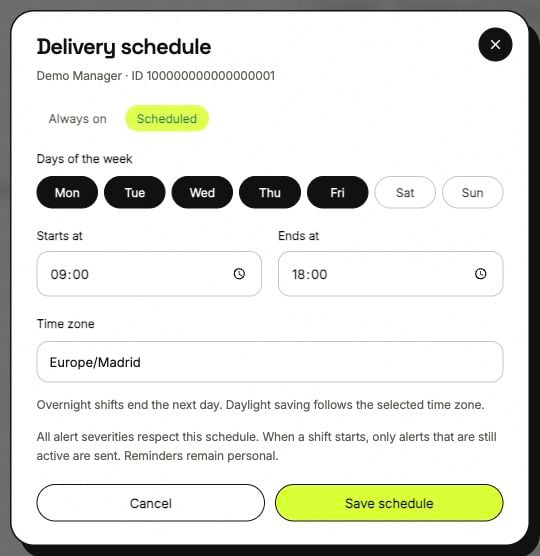
The delivery schedule in ANSIO, shown with a demonstration recipient.
All severities respect the schedule, including Critical.
An overnight shift ends on the following day. For example, Monday 22:00–06:00 runs from Monday evening to Tuesday morning. The selected day is the start day.
Equal start and end times are not a 24-hour schedule; choose Always on for that.
When a shift starts, only alerts that are still active are sent. An incident that started and resolved while delivery was off does not become an old-message backlog.
The schedule affects notifications. Bots and server monitoring continue to run.
No message arrived
Work from the incident toward the recipient:1
Find the incident in Alerts
Confirm the client and pair, remove restrictive filters, and see whether the condition has reached its Waits period. Not every temporary error becomes an alert.
2
Read the recipient state
The recipient must be connected, enabled and authorized for internal alerts. Client read-only access does not receive the internal Manager alert feed.
3
Read that recipient's rule
Off suppresses delivery. A personal severity or reminder value may differ from another manager’s settings.
4
Read the timing controls
Look for an incident snooze, a delivery window, a timezone difference or a vacation pause.
5
Read delivery health
Look for a Telegram delivery failure or connection issue. After correcting it, the owner can use Send test to verify the destination.