A task did not run?
Read expired proposals, permissions, scheduling errors and pending verification.
Ask a question
Useful questions identify the account and the uncertainty:- “Why is the STG spread wider on Bybit?”
- “What needs attention on this project?”
- “Which settings changed on this account?”
- “Can you explain the difference between account value and PnL?”
Request a change
Include the client, exchange and strategy when more than one account could match. Then state the change and timing. For example: “Reduce the STG Futures order size by 25% on Bybit.”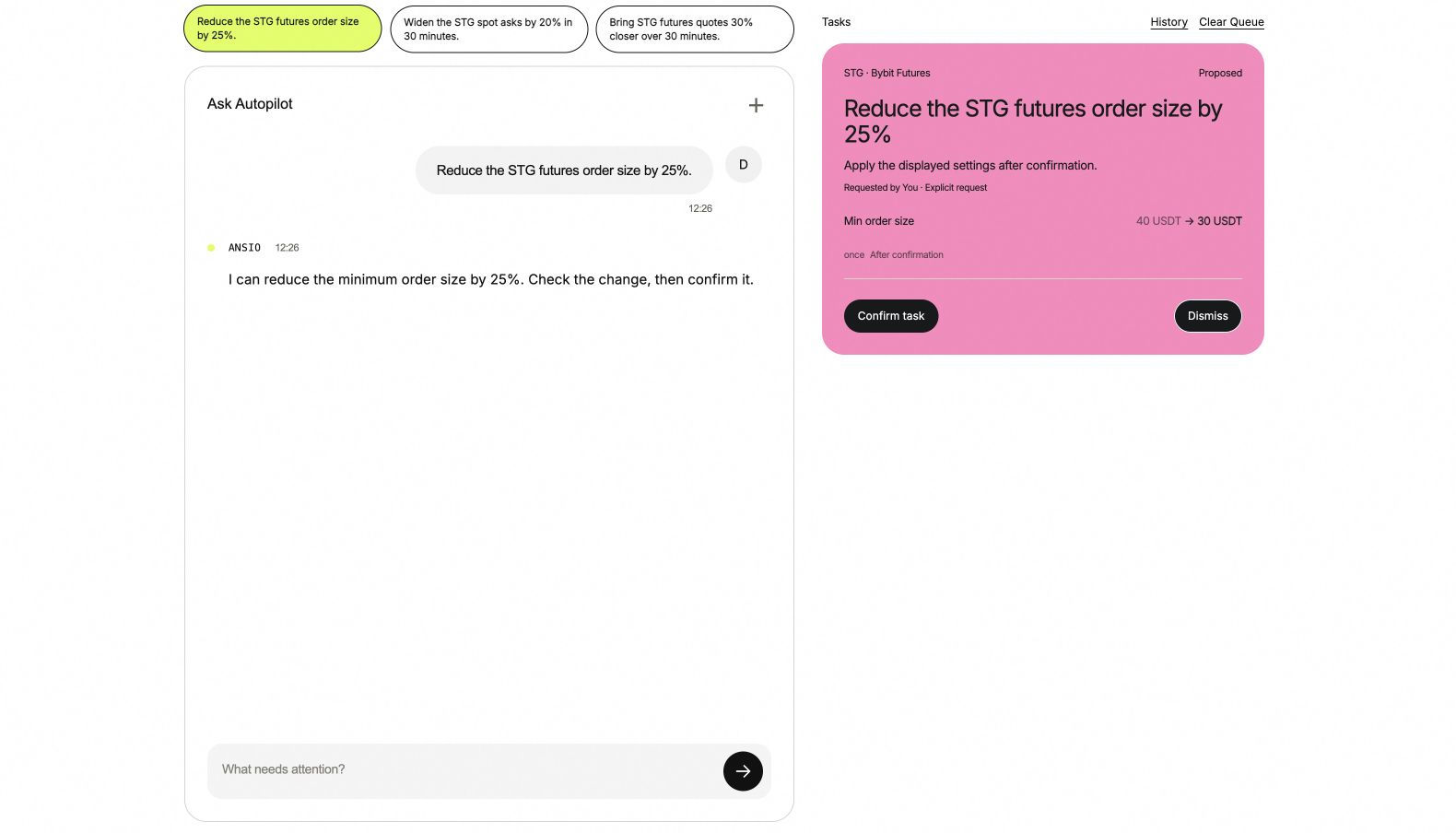
A demo request becomes a proposal. The card identifies the account and shows the exact change before confirmation.
Read the proposal
1
Account and action
Confirm the client, venue, market and strategy on the card. If the request is ambiguous, clarify it before continuing.
2
Before and after
Read the actual fields and values. A proposed change is not yet an applied change.
3
Timing
Read whether it runs once, later or over a period, including the displayed timezone and end time.
4
Confirm
Use the card’s action, such as Save & restart for a settings change or Confirm task for other supported tasks.
5
Follow the result
Watch the task state and the Changes record. An accepted request still needs an execution result.