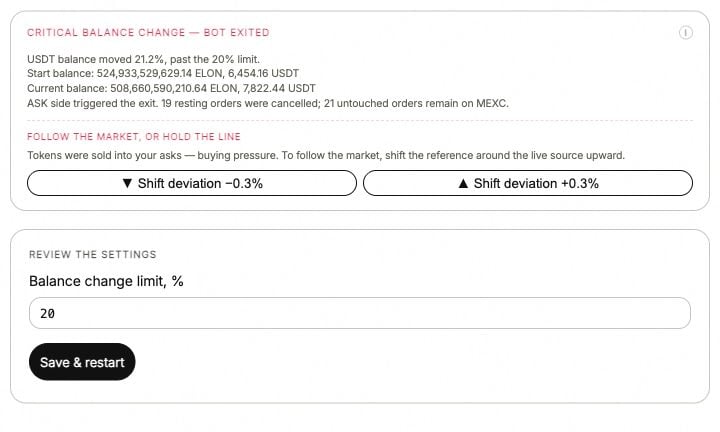
A balance guard in the ANSIO demo. Values and recovery controls shown here belong to the demonstration.
Critical balance change
You may see Critical balance change orThe balance has been critically changed. The quote-currency balance moved past the configured Critical balance change limit.
Compare the starting and current balances in the error with recent fills, transfers and funds reserved by orders. A balance change alone does not establish whether the account made or lost money. Review the threshold against the allocation you intended before deciding to resume.
Critical token change
This is the token-side guard. Read the token amount before and after the change, then the fills that explain it. Buying and selling can change the token balance even when the combined account value changes much less. Changing Critical token change allows a different amount of movement. It does not reverse previous fills.Balance not enough
Variants includeInsufficient account balance and BALANCE_NOT_ENOUGH.
The next order needs more available currency or tokens than the account can use. Total balance can include funds already reserved by open orders. Compare Total / Available / Used, the allocation for that side and the other bots using the account.
Order below exchange minimum
The raw message can containLessThanMinVolume or Order total cannot be lower than ….
Read the minimum quoted by that exchange for that pair. There is no single minimum that applies to every market. Quantity rounding can make an order fall below the minimum even when the unrounded amount looked large enough.
Review Min order size, Quantity precision, the side’s allocation and the number of levels together.
Order params error
The venue rejected the order’s parameters. Keep the full exchange response: it may identify the price increment, quantity increment or minimum amount. Compare Price precision and Quantity precision with that market’s accepted increments. More decimal places do not automatically make an order valid.Setup validation error
The settings could not form a valid MM configuration. An older response may mentionMMBotParams, side_balances or balance_part_for_order.
Review the fields identified by the error, especially side allocations, level counts and minimum size. Apply the corrected configuration through Save & Restart when required, then read the result.
Not enough quantity in the order book
ANSIO could not obtain enough usable book data for the operation. Open the exchange book and the selected price source. Look for a missing bid or ask, an empty market or an outdated snapshot. A visible last-traded price is not a substitute for a usable two-sided book.Rates problem or No quote
The bot does not have a usable price reference. Read the source name, pair or pool, bid, ask and update status. Restore a valid reference before resuming quotes. The error record and your guard policy determine whether existing orders were cancelled or held. Do not infer that from the words No quote alone. See price sources.Fewer levels, one side missing or no Depth Support
These can be settings rather than errors:
See Depth Support and inventory controls.
Unrecognized error
ForUNKNOWN_API_ERROR or an unfamiliar venue response, keep the exact text, time, account, bot and latest strategy record. The label alone is not enough to choose a fix.
Send these details to Support. Leave API secrets out. An exited strategy does not prove that all exchange orders disappeared; read the order book before requesting another start.