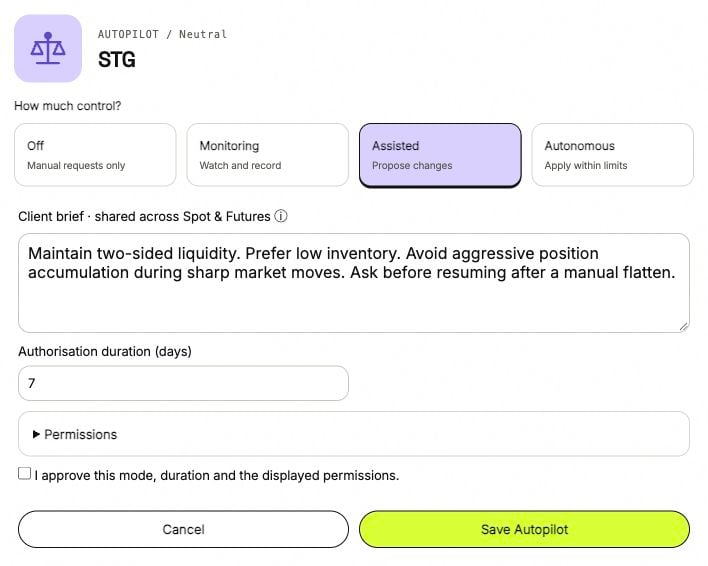
Autopilot can observe a book, propose changes or apply permitted changes. The mode sets its level of control; the permissions set the exact fields and bounds it may use.
Autopilot setup with Assisted selected, a client brief, seven-day authorization and an expandable Permissions section.

1 → Choose a mode. 2 → Set the duration. 3 → Expand Permissions before approving.

Modes

Turning Autopilot off does not, by itself, stop an already running trading bot. The bot and Autopilot have separate controls.

Brief, duration and scope

The Client brief is shared across the client’s Spot and Futures books. Use it to describe the goal and constraints in plain language. The mode and permissions belong to the selected book. Authorization duration is set in days, from 1 to 30. A brief does not grant a permission that is disabled or outside its bounds. Available Spot fields include bid and ask steps, spread shifts and balance allocations. Futures fields include base shift, step, skew sensitivity, target position, quote offset, level counts and minimum order size. Where permission bounds use a fraction, 0.01 means 1%. These bounds are distinct from the percentage labels in strategy sliders.

Limits that still apply

Autonomous mode does not grant permission to change leverage or perform a market close. Account balances, exchange rules and the strategy’s own risk limits still apply. After a manual Stop or Flatten, Autopilot needs a new explicit approval to continue. Changing mode does not remove that requirement. Use Questions and tasks for a specific request, and Queue and records to follow its outcome.