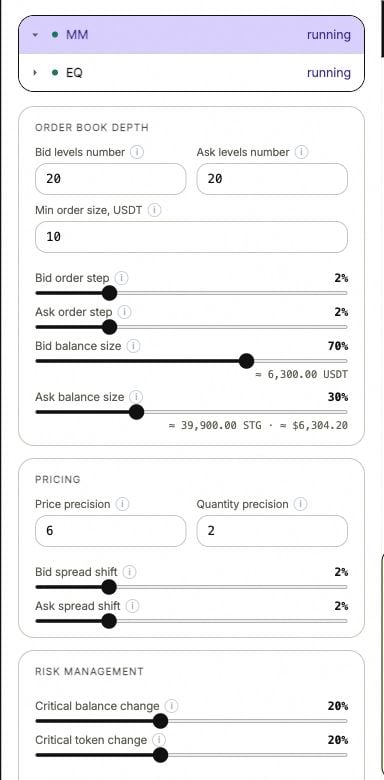
Spot MM settings. Order book depth controls the ladder; Pricing controls precision and the shift from the reference.
MM stopped or orders are missing?
Read balance guards, insufficient funds, exchange minimums, precision and source errors.
Set the ladder
More levels spread the allocation across more orders. They do not add funds to the account. If an order becomes too small for your minimum or the exchange minimum, the displayed ladder may have fewer levels than requested.
Position the quotes
Bid spread shift and Ask spread shift offset the ladder from the calculated outer bid and ask. The price source supplies that reference. These shifts and the order step do different jobs: a shift moves a side; the step changes the gaps within it. Price precision controls price rounding. Quantity precision controls size rounding. Both need to fit the market’s permitted increments.1
Choose the account and MM bot
Open the settings for the exchange and pair you intend to change.
2
Adjust the ladder
Set the level count, minimum size, spacing and balance allocation. The amount beside each balance slider helps you see the allocation in currency or tokens.
3
Save and restart
Use Save & Restart to apply the pending settings. Moving a slider alone does not update the running configuration.
4
Read the result
Look at your marked orders in the book and the bot status. If levels are missing, see Orders and limits.