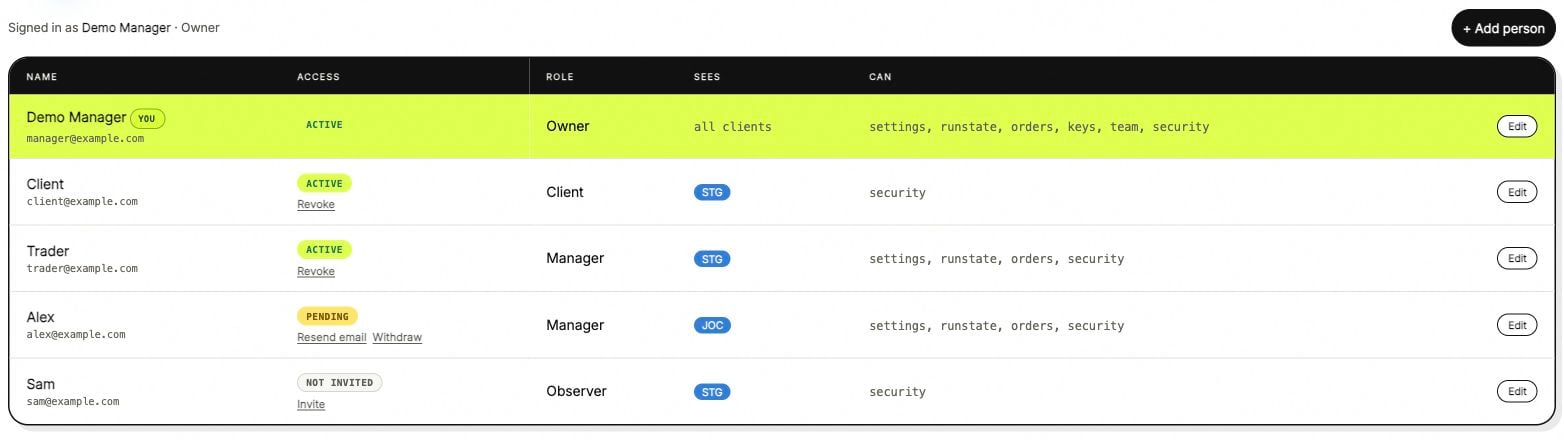
ANSIO uses roles and account scope together. A role defines what a person may do; the assigned accounts define where they may do it.
ANSIO team roles and account scope with demonstration users.

The team table shows role, account scope and permissions together. Names and addresses are examples.

Roles

Listing access is separate from the basic role. A Manager label alone does not describe every additional permission.

Set the scope

In the person settings, review the role and the client or account selection together. A client’s view should include the accounts intended for that client. A manager can work across several assigned accounts. Client scope and role are separate fields. Selecting a client does not, by itself, change a person’s role. The account owner manages team access. If a person cannot see an account, review their assignment before changing unrelated exchange or bot settings.

Trading managers

Use one client context at a time when editing a bot or requesting an Autopilot action. The account, venue and pair on the action card are the final reference for what will be affected. To investigate a change, open Autopilot records and the account’s activity. Read the requester, time and changed fields together.

Telegram is separate

Telegram Manager or Client access has its own authorization. It should not be assumed from a person’s web role. Client Telegram access is read-only for the assigned client. Additional Autopilot question access must be enabled by the owner. See Telegram controls. For exchange-key permissions, see API access.